30 March 2015

Digital Playmat Design Process: Part Two

At the end of the last digital design tutorial I had gotten to the point where the final sketch had been composited together. Today I'm going to cover the second half of the process looking at inking, blocking in, colour pallets and using the layer options panel.

1. Digital Inking  

There are several ways to ink a digital design but the method I've chosen to use is probably the most straightforward. I'm going to be drawing over the sketch using a small round brush and my graphics tablet. Admittedly if you don't have a graphics tablet your mostly likely going to want to use the pen tool method.

The upside of the way I'm going to do it is that it's typically quicker than using the pen tool and any line thickness you want to work into the design can be done by varying how hard you press the pen to the tablet right then and there. you also tend to get a more dynamic image where the pen tool would give you something a bit more technical.

The downside is that you lines are going the be rasterized and therefore not infinitely scalable with pristine edges which could be an issue later on if say we wanted to blow the image up huge but we are going to mitigate this a bit by working at a really high resolution, at least 300dpi but probably 600.

What we need to do to get nice flowing lines then is use long quick assured movements to draw smooth clean brush strokes. Moving slowly or using short strokes is going you lead to wobbly lines or messiness. Similarly we don't need to worry if we draw the line further than we need to since we can clean that up later in fact you will be intentionally drawing longer than you need to most of the time especially on curves. If you make a mistake or don't think the line looks quite right just hit undo and draw it again.

For a more manageable less stressful time later in the process its also best to start breaking the image into sub sections. A layer for the shape of the face, another for the eyes, for the hair, and so on until you have a collection of layers that can all go in one folder marked Head. Keep working through each section until you have folders for each body part and then move on to the next character or whatever else is in the image.

Once the lines are done and you have cleaned everything up next you have to decide if your shadows are going to be inked like mine are or if your going to use another style theres no real right choice just preference and how you want the final piece to look.

These shadows are done in much the same way as the outlines, for example make a new layer for the foot, decide where the light source is and start colouring with the brush tool and tidying up with the eraser. Here I'm trying to use the shadows to emphasize shape and texture especially in the J-Rex's skin you wont need to worry about sooth lines so much at this stage the eraser will help keep the edges clean what I am after is trying to get a sense of volume or weight.

2. Blocking in the Colour.

Now we know where the lines are we can start colouring the image. Its tempting to flatten everything and then try to draw inside the lines but that's actually quite time consuming and will hinder later progress. Instead we are going to make more folders full of layers and each of these layers is going to contain a colour shape that corresponds to an area bounded by the black outlines. The J-Rex's foot folder for example is going to contain layers for the foot as a whole and each individual claw.

Some of these shapes are going to cover vast areas others are going to be tiny, it will depend on the area in question. Large parts of green on the J-Rex for example are all one shape but then there will be other colour layers above that to provide additional detail or more localised special effects or markings.
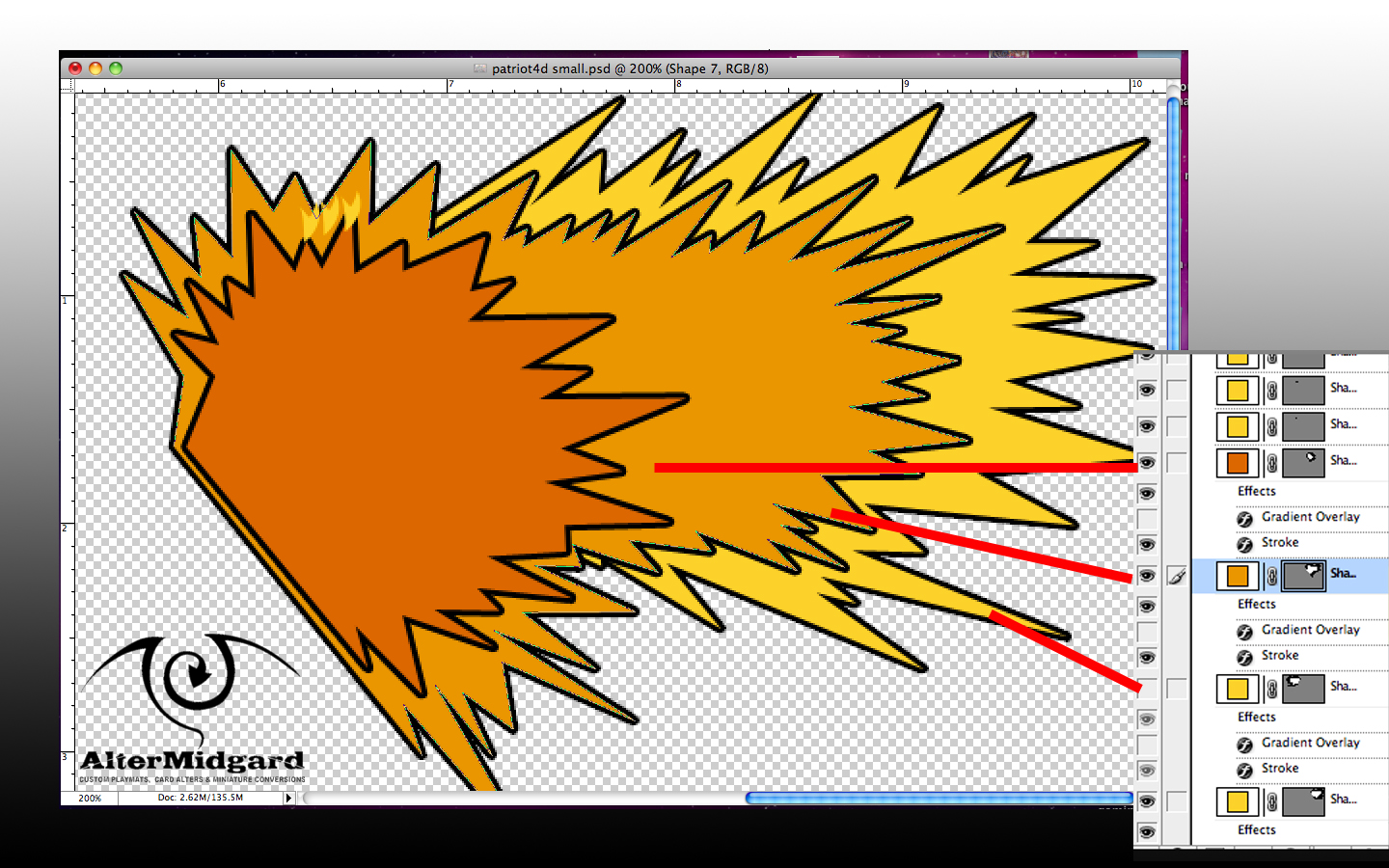
You can block in the colour in three main ways. A) With the brush which is quick and good for small areas but may miss bits on larger sections. B) With the lasso tool which can quickly be used to follow the outlines and then filled with colour from the paint bucket or C) With the pen tool which will give you the most control, wont randomly decide to close the loop like the lasso tool has a tendency to do, and can be set to generate vector shapes.

I used all three techniques on this image. Here for example you can see three vector shapes drawn with the pen tool because its going to give me the spikes I'm looking for and because if I was to try and do this with the lasso it would just get frustrating.

Once your done blocking in you should have a group of folders that look a lot like the group for the outlines. You can also now start messing about with how all these blocks of colour are displayed. 

3. Colour Pallets

I'm going to keep the number of colours in this image relatively low since I'm going for something thats a bit pop art in style and near the end I will be adding at least one halftone pattern for a similar effect as the test images in the first part on this tutorial.

The five colours I've chosen to go with for J-Rex can be seen in this image, Paige's colours, the blues and yellows, come from an additional 5-6 colour pallet although if you go look at the final image you can see I've cut the use of yellow significantly by that point. It's also possible that I should have made the red light sword one of the purple colours, however I stuck with red mostly because the blue/red laser sword rivalry already has cultural weight and meaning. Its a lot easier to tap into context people already understand than having to explain something new.
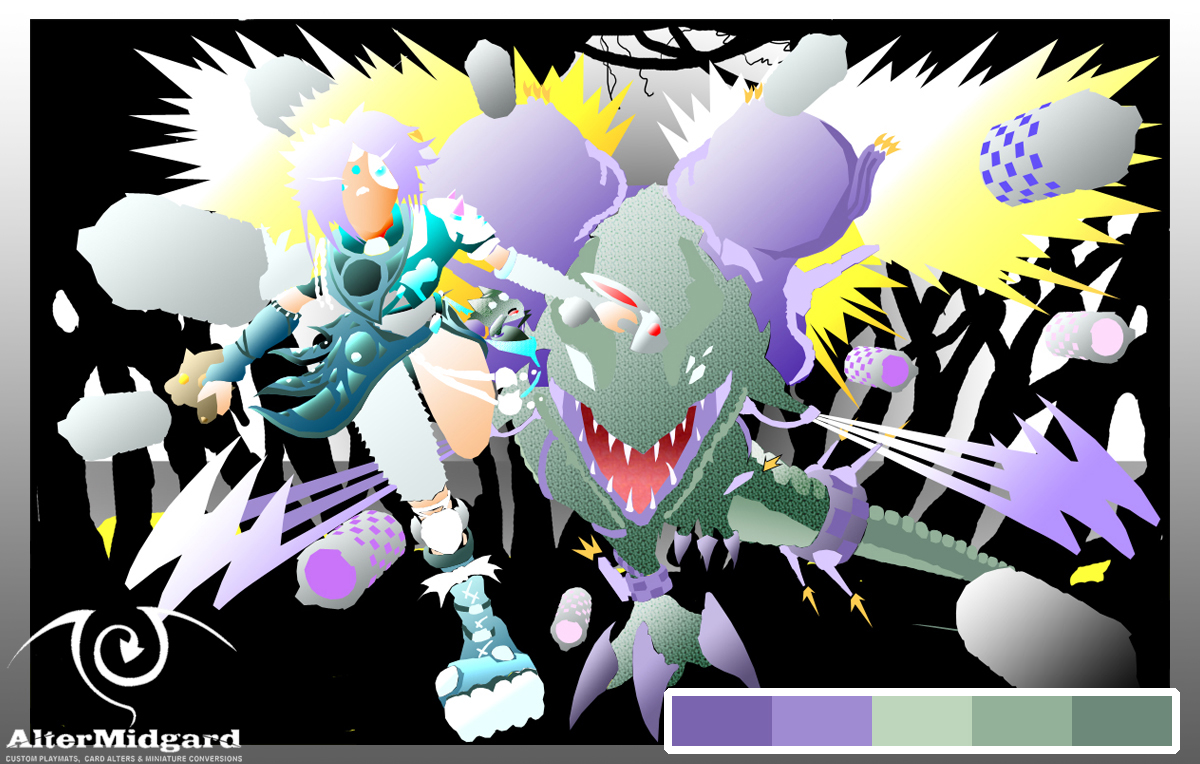
Looking at the J-Rex pallet there are three greens, a light, a dark, and a mid tone. I could have just flat shaded the whole of his body using these three colours, and technically thats the case but then I decided to add gradients which have filled in all the greens between the lightest and darkest shades.

Next we have the 2 Purples. On the colour wheel purple (well magentas and reds) are opposite the greens so putting them together gives you a high contrast which can be useful for making the image easier to read or in this case more appealing to the eye.

The purples are missing the mid tone in this image but the light and dark purple have been selected to have the same colour value as the equivalent green (the green light and the purple light have the same level of lightness). Again once all the purple areas were placed gradients were applied.

The easiest way to build colour pallets is to chose a colour you like and then feed it to an app or website and it will give you back suggestions for colours that work well together. The blue/teals in Paige's pallet were suggested this way although looking back now I'm not entirety sure its exactly right or perhaps I just needed to add more of it to the rest of the image. Then again because of the way I went about creating this image if I wanted to swap those colours out it would be relatively straightforward as we will see in the next section.

4. Layer Options

Its worth bearing in mind I didn’t see my first proper computer until I was about 7 or 8. what I'm trying to say is that A) there wasn’t exactly much in the way of image editing software back then and B) chances were pretty high that we were as likely to know how something worked in an IT lesson as the person teaching it.

Which is a long way of saying, having taught myself most of this stuff I've tended to use it in a particular way.

Having to teach someone else how to use it though, well thats a whole different ball game and so it was that I suddenly found myself presented with the layer options/style screens in photoshop and an actual understanding of what they were for and how much time you could save using them.

For example you draw a figure and then decide later you want to change the hair colour:
  • You could paint over it.
  • You could add adjustment layers, masks, or mess with the hue and saturation from the menu at the top of the screen.
  • Or you could double click on the layer containing the hair colour and scroll down to Colour Overlay mess with some option and click ok.
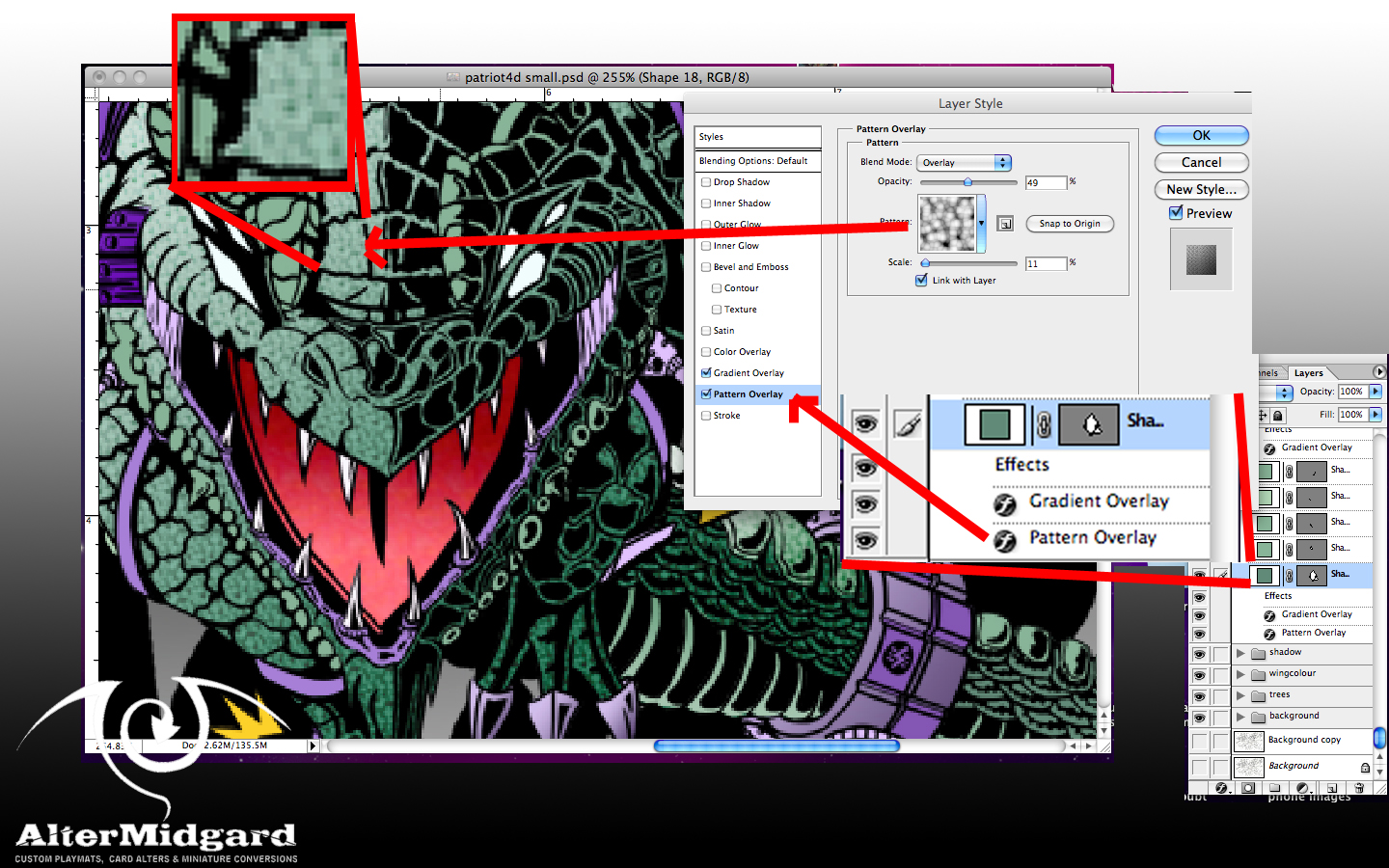
Admittedly this last way is only an option if you have separated all the sections into separate layers but not only is it quick it is also infinitely adjustable and most importantly reversible.

I didn’t just stop with adjusting colours though. The main way this tool was used in this project was to set up gradient overlays because the options provide extremely fine control of size and direction. Also once you are happy with the effect you can drag and drop it on to other layers to replicate it exactly.

In the above example you can see I have also added a textured pattern overlay to the J-Rex's skin, didn’t really have to but since the style panel letter you experiment without really messing anything up it was one of those things that I tried and decided I quite liked.

Once you have set up all your special effects you end up with something a bit like this. There's still quite a lot of work to do on the background which aside from the halftone pattern is done mostly the old fashioned paint it all in one layer style. Theres also quite a lot of fine tuning left to do especially on the missile trails but since everything is set up to be coloured via layer styles it's just a matter of going in and changing a colour here or a gradient there.
And considering the amount of layers and the image size and resolution theres also the fun game of making sure my computer doesn’t overheat.

But I'm going to end this here because you can go back and see the final piece in Part One and more importantly this post has been about the fun you han have getting there rather than the destination.

Next time back to our usual programing (looking at hand painted mats)


23 March 2015

Custom MTG Dr Doom and Doombots Zombie Tokens

Things have been rather hectic of late so I thought it would be a good idea to ease back into blogging with a short post about a set of tokens that I have recently created.

I didn't need to, create them that is, not in the sense that their existence was required at least. On another level however it was vitally important that i got the idea out of my head and sometimes the most expedient way of doing so is just to get on and put pen to paper.

Mostly stylus to graphics tablet in this case, then printer to paper, but you get the idea. Like a song that gets stuck in your brain on loop I couldn't stop thinking about how amusing super deformed Dr Doom tokens would be.

Once you have decided to create Doom tokens however the real issue becomes what creature type should they be? The smart money is on looking at the meta and choosing the most used type but there was just something that felt off about doing them as soldiers or warriors, Dr Doom is no measly 1/1. In the end I went with my first choice and zombies it was.

You cant have Doom doing all the heavy lifting though, no he's got a country to run and superheros constantly messing with his schedule. 

He's a busy man so whats needed are some lackeys and if there's one thing zombies do well its numbers. not so much counting mind, more the physical quantity, although in this instance the fact that they are Doombots should mean they have some basic grasp of maths.

I went with your standard old school basic comic Doombot for the rank and file members of the squad because they would be a similar height to Doom himself and would fit the space better. Then brought in the bots from the Fantastic Four: Worlds Greatest Hero's cartoon to act as the heavies and fill out the background. whichever version you go for the important part of making them super deformed is to make the bodies significantly smaller than the head which usually ends up being at least a thrid of the size of the character.

Finish your squad off by splitting them across a series of cards for that added teamwork factor when you play them to the battlefield, add some fancy glows and a bit of depth of field to get more benefit out of the fact your putting them on foil, then all you have to do is set up a sheet of them and hit print.

Well then you have all the fun of craft tools and glue but the drawing part is over at least.

If there's anything that's defined this year so far, aside from the obvious lack of posts, is that things have progressed somewhat, mostly in therms of my own skills,

Its partly why I wanted to start with these tokens, there's just something about the fact that I can now do rounded corners that makes it seem like things are starting to come together, especially when you combine them with the fact I have started adding my own backs.

I wasn't happy with the way the tokens I had been making were a bit on the thick side. While creating a custom back makes the production process more complex, lining everything up and bonding the various layers together can be tricky, but combined with the rounded corners gives a sense of completeness that some of my tokens had been lacking up until this point.
So in a way maybe they did need to exist, it was just one of those moments where everything comes together to make something cool.


24 November 2014

Digital Playmat Design Process: Part One


Something a bit different this time as I'm going to go over the first half of the process of creating a piece of art digitally. Usually you see a bit of this as I work my way through producing a mat by hand but this might be the first time I've shown the process end digitally. In this first post I'll be covering concept art, compositing, and going over the production of 3D elements. I'll save a look at the processes of colouring for part 2.


Step One: Concept This.

Theres no real design brief for this project outside of 'do whatever you want but keep it to the dimensions of a playmat with 0.5 inches around the edges clear to allow for colour bleed' if the design gets printed.'

With free reign to do whatever I like the first decision I make is to do something completely original, I'm going to avoid using existing characters from existing media. This limits things slightly but in the grand scheme of things and with the vast worlds of my imagination to pull from it doesn't really feel like it helps much. We need to narrow the theme down a lot more before be get started on any drawing.

I quite like the idea of working with a limited colour pallet. Since I'm working digitally a super-flat style is an option its a style I've been coming back to since secondary school but always end up philosophising about how its not truly flat until you can produce things one atom thick 

Day at the beach,
warning neon
Trees. 
I start going through a collection of colour pallets, I'm very much aware that none of my art teachers ever really tried to instil in us a proper working knowledge of colour theory, 'heres a colour wheel get on with painting those flowers' was about it so while I'm very comfortable working in black and white having colour swatches, saved pallets from previous projects, samples from films and TV shows and an app that can check my colour choices is rather reassuring.

Finding some halftone patterns in rather garish shades of blue and pink that I quite liked I decided to do some quick digital sketches to see how it might look. Its not quite super-flat but I do like the mix of elements and colours. The idea of having so much black in the image will come up again in part two.

At about the same time I start wondering about the story the mat is trying to tell and end up in a train of thought that goes something like this. Its a design for a competition where I can draw what I like but whats the end result for? Prizes for competitions? Who gets one of these, the winners? The best of the best who have clawed their way up through rounds of swiss and then a knockout top cut? Apex predators? People like dinosaurs right?

Perhaps its about how sometimes you find yourself sitting down opposite a monster, maybe that player who for whatever reason you just cant beat or one of those big fish you hear about who play at the big events. I like dinosaurs. If you strapped jet engines to a T-Rex it would be at least twice as cool right? Maybe thats too obvious? What if the T-Rex wasn’t the biggest monster in the image? What if the T-Rex could fire missiles?

A rather odd chain of logic to be sure but it was enough to get me to somewhere to start, there was nothing for it but to draw a Jet-Rex and some missiles.

The initial missile concept came out of one of the designs I had done for a project at university which involved a round smiling character with weird eyes which even before that had started as a doodle of a potential signature. The T is upside down the M in the form of teeth. You could also say this line of thinking eventually led to the Altermidgard logo but as much as I like logo design that is a topic for another time.

He was called Byte, and now he has some firepower.
At this point I also had the idea that it might be fun to make some elements in 3D which is why I ended up drawing the Missiles from various angles, working out how the thrust vectoring would work, nosecone variations, possible fish based missile launchers and so on. As I drew it became apparent that there was a distinct animals as objects theme creeping in.

J-Rex came fully formed, it took quite a while to work out his pose, I had to go and research T-Rex skeletons before it started looking right but once it did he almost drew himself. The main differences between this image and the final piece is the placement of the head to make him look sleeker and the way the tale wraps around.

On the flip side Paige came about because I had noticed I was drawing animals and so just started sketching armour made out of them. Paige became the real villain of the piece when I drew the mini J-Rex in the bag, 'well of course' I thought, 'she's wearing all these dead animals, why wouldn’t the J-Rex want its kid back'

Then I wondered what weapons she would use, they would be animal based obviously, initially drawing a rabbit laser sword was just a joke but then I drew the cat to make a pair and wondered why not? The fact the ears and tail make very good hand guards was just too amusing not to use. Its not as apparent in the final piece but the reason the weapons are different colours is because the rabbit was sun themed and the cat themed for the moon.


Step Two: 3D That.


It had been some time since I had done any 3D work so this was a perfect opportunity to get back in shape as it were (that shape being a teapot). Since I wasn’t going to be using these models in a game engine or anything and I also didn’t want to spend too long on this step since in terms of the project as a whole it would be eating time while only providing reference for the final piece I therefore didn’t worry to much about optimising the mesh of the missiles. They could have been lower poly especially in the spherical areas but as reference images they would be fine.

The swords on the other hand were done properly. Starting with one polygon and extruding the edges to gradually build up the object until I had what amounted to half of the whole object. Because obviously if you make half of something that looks the same on both sides it takes half the time and you can guarantee both sides are the same when you apply a mirror modifier to it.

Being more confident and having remembered the skills that had lain a bit rusty, by the time I made the cat sword I decided to go back and remake the rabbits spine based on the cat's so as to make the two look a bit more like a pair. they both also needed a bit of rescailing to bring them in line size wise. After that I spent some time messing around with materials trying to find something that would look cool when rendered the glow effects were nice enough but in the end I didn’t use any of them and just smooth shaded them ready for use in the final image.

I also had a go at adding particle trails to the missiles but since I wasn’t making a movie they never looked quite right, I had this idea in my head that stars would make an interesting trail, perhaps I would try that.

Finally in this stage I had to figure out Paige's pose, at which point I got a bit stuck and ended up going back to basics and testing the poses out on a mannequin. I could have got what I was looking for by using a program like Poser but sometimes its just quicker to do things the low tech way with wooden figures Blutack and Gundam weapons.


Step Three: Composite All.

All the disparate elements now created I could start putting things together.

production pipline. Imagine all the images
from above feed into here.
First things first lets work on the sketches. Paige is still a bit basic at this point and I wasn’t happy with J-Rex's head.  Combining the various parts on top of an image full of golden ratio spirals (heres one I prepared earlier) I cut, cropped, rotated, moved, squashed and stretched until I had things lined up where I wanted them, mostly following the patterns of the spirals and points where they intersect. For example Paige is built entirely on the idea her head is placed at the top left intersection of the rule of thirds grid and her limbs and swords follow other spiral lines. Once I had everything set up the way I wanted I went through a few stages of redraws and then the image was ready to be combined with the 3D elements.

On the other side of things I pulled the various 3D models into one scene and placed a box that I could apply the 2D sketch to so as to get a better idea of where the missiles should go. Placing each instance of the missile model became a case of moving them closer or farther away from the camera and rescaling them where required, if you could look at the 3D space in motion it would end up looking a bit like one of those perspective tricks you see on that car advert at the moment.

Placing the swords was a similar process slightly complicated by a slight issue with one of the rotation axis. Once everything was in place I set the render options up to give me a bright background I could chroma-key out later and after making sure the camera was in the right position I rendered the scene in the highest setting I could.

The 2D and 3D sides of the project are then combined, and flipped in the case of the 2D, part to create another image that I will print out at full scale and use to redraw the final image so I can add the final stages of detail. The star missile trails get added, J-Rex finally gets his long metal fingers sorted and Paige's clothes are finished.

Once scanned back into the computer the job of colouring it digitally will begin and in part two I will discuss how much choice of raster over vector influenced the final look of the image, why layer options are so powerful and most likely a number of other things I haven’t thought of yet.

Until next time, roar like a J-Rex.


13 November 2014

Skull Servant Custom Playmat


Last time was quite a long post so lets keep things a bit lighter in this one. Which today is going to take the form of two short stories that while meant to be fun with will weave in elements from the development of the Wight mat. Without further introduction I introduce:

The Master


Upon my arrival at the address my apprentice had scrawled on a scrap of paper I found much to my surprise not a house as I was expecting but a dilapidated graveyard. This sort of error could not be tolerated, I made a mental note to reprehend the scoundrel upon my return. I was just about to turn and leave when a tall moustachioed gentleman stepped out from behind a large tomb and held out a hand in greeting. Sir Wightmare, as I would later discover he was named, was by all accounts a rather jovial fellow which seemed rather at odds with his rather extreme gaunt appearance. I took the offered hand and found it to to be equally if not more desiccated as his face.

Sir Wightmare assured me I was in the right place and escorted me to meet the rest of the family. They were a pleasant enough bunch if like Wightmare perhaps a tad in need of a decent meal or two. I pondered this as I set up my camera, it was rather odd that they could afford my services and apparently a butler but all appeared grossly under weight. Being the upstanding Victorian gentleman that I am needless to say I kept this observation to myself, it wouldn’t do to insult the clients even if Lady Wight appeared to be almost skeletal.

Sir Wightmare and his nephew Wightprince were the only members of the family who were apparently ready for their portrait to be taken, dressed as they were in their finest outfits, also because I am an upstanding gentleman I did not mention that said finery was clearly not of the latest fashion. It almost seemed as if they had been wearing it while rolling around in the dirt, stained and frayed as it appeared.

The way Wightprince ran around with the family hound made me think this was likely ti be the case.

Lady Wight was in something of a state over her dress, she went through a number of costume changes all of which were in a rather rich chocolate colour. After many such changes I felt time slipping away from us and suggested that perhaps she should just go with her newest garment, an outfit who’s lower half featured a strong sharp outline and interesting if somewhat plain fold design. It was clearly within the fashionable trends of the era we are living in, if perhaps a tad basic for a Lady of her apparent standing. Again as the gentleman that I am I did not make this last point to the lady herself.

Lady Wight's husband King was perhaps worse than his wife. Arriving late and refusing to remove his work clothes he was in the end persuaded to put on his most fancy work garment which featured frilled cuffs and a high collar. His brother in law also managed to get him to put on a rather sharp looking waistcoat and tie. I had to admit with the pocket watch as a fine embellishment he almost appeared the very model of a fine Victorian gent. This despite his refusal to wear any shoes.

I never did discover what line of work the head of the household was in, something to do with civil servants I believe.

With all members of the family gathered the next task was getting them all to stand still while the photographic plate was exposed, there was a near constant creaking, Lady Wight had to lean both against a tombstone and her son so frail did she seem. I was glad however that all the horseplay had exhausted the hound since the bat that became entangled in the Lady's hair almost caused the picture to become blurred with its frantic attempts to free itself. 

The delay to calm it gave one of the families butlers time to wander into the frame apparently to offer refreshments. I hate to say it but I lost my composure removing the lens cap I bellowed at the servant to remain perfectly still. 

Being the gentleman I am I of course apologised for my outburst as soon as I had replaced the cap and allowed the family to move again. It turned out the family did not feel overly aggrieved by my shout, the butler in question had been with them a great length of time and was now rather ancient.

I did note however that somehow old Skull was decked out in the most up to date of butler attire perhaps he wasn’t as senile as they seemed to think.

I declined refreshments as I indicated that I must be on my way my next appointment. The family seemed rather upset but I insisted.

When they fell on me and I noted my life flowing out of me I did not make a fuss.

I was, after all, a great Victorian gentleman.

The Apprentice

When I came to open the photography emporium I am apprenticed to I found the masters camera and belongings left on the step of the rear entrance. Of the master there was no trace which was unusual since he is a most punctual man and often reprimands me for my tardiness, even when I am in fact never late.

Once my morning duties which mainly involved the cleaning and upkeep of the store were taken care of I set about developing the plates that had been in the masters bag. By force of habit I also checked the camera and with little surprise found one plate still inside. The master could be somewhat forgetful at times.

The resulting photograph was somewhat shocking featuring as it did what appeared to be a family of skeletons posing in front of a crypt. An otherworldly purple sky was contrasted by eerie green clouds, or trees, or possibly both.

I had to admire despite the subject, that the master had managed to frame the image almost perfectly I did feel however that the way the interior of the crypt was the same colour as the sky needed some slight correction before I handed over the final image.

Applying a selection of chemicals to a number of copies of the original image I managed to produce a number of variations. Most shocking was the variation that seemed to reveal a portal, to where, my sane mind would not let me imagine.

I spent the rest of the day behind the counter awaiting my masters return. Near closing time when he had not I set about wrapping the days photographs for delivery, I would hand deliver a number of them upon closing the shop.

The image for the Wights I would pay to have delivered.

…

Until next time .